What this page does differently
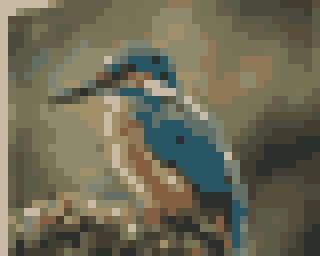
Everything else on this site is built for photographs, where a smooth enlargement and a reconstruction network are the right tools. Pixel art is the opposite case: its value is in hard steps between a handful of colours, and every smooth method blurs them. This page enlarges by whole numbers only and copies source pixels only, so the palette of the result is the palette of the art — and the page checks that on every result rather than promising it.
| Nearest-neighbour | Edge-aware (Scale2x / Scale3x) | |
|---|---|---|
| Factors | 2×, 3×, 4×, 5×, 6×, 7×, 8× | 2×, 3×, 4×, 6×, 8× (5× and 7× fall back) |
| New colours | None | None |
| Diagonal edges | Staircases, exactly as drawn | Rounded off where neighbours agree |
| Best for | Sprites for games, exact reproductions | Icons and art shown large, prints |
What it will not do
- It does not invent detail. A 16 × 16 icon at 8× is still sixteen pixels of drawing, each 8 pixels wide.
- It is not for photographs. With thousands of colours, square blocks look like a mosaic; the page says so and points to the photo upscaler.
- An animated GIF is enlarged as its first frame here. The GIF upscaler keeps every frame, with a Pixel setting that uses the same nearest-neighbour rule.
Questions about this
Why not use the AI upscaler on pixel art?
Because a super-resolution network is trained on photographs. It treats a hard step between two colours as an edge to soften and fills flat areas with texture, so the square pixels the artist placed come back rounded and smeared. This page runs no model at all.
What is the difference between nearest-neighbour and edge-aware?
Nearest-neighbour turns every pixel into a k × k block, so the result is exactly the drawing, only bigger. Edge-aware uses the Scale2x and Scale3x rules: where two neighbouring pixels on a diagonal match, the corner of the block takes their colour, which rounds off staircase edges. Both copy existing pixels only, so neither adds a colour.
Why only whole numbers?
Because 2.5× cannot keep pixels square: some source pixels would become two output pixels wide and their neighbours three, and the art would wobble. Whole factors from 2× to 8× keep every block the same size.
Why does 5× or 7× ignore the edge-aware setting?
Scale2x and Scale3x work in steps of two and three. 4× is two 2× steps, 6× is a 2× and a 3×, 8× is three 2× steps; 5 and 7 cannot be built from those, so the page draws them with nearest-neighbour and says so.
My sprite was already saved bigger. Does that matter?
The page measures it. If every run of equal pixels divides by the same number, the picture was enlarged before, and the page offers to start from the original art pixels — so 4× means four times the art, not four times a blurry stretched copy.
Is the image uploaded?
No. It is read, enlarged and written as a PNG inside this tab. Nothing is fetched for this page at all — no model and no codec.
Next on this site
For a moving sprite, the GIF upscaler keeps every frame and its timing. Flat-colour illustration that is not pixel art — anime, logos, AI art — goes to the anime upscaler.
- Upscale GIFAn animated GIF enlarged frame by frame: timing and loop kept, one shared palette, the size shown before it runs.
- Anime upscalerIllustration, anime and AI art: hardest clean-up, least sharpening, flat fills kept flat, saved as PNG.
- PNG upscalerTransparency enlarged on its own and recombined, so cut-outs and logos get no halo. PNG out.
- Upscale imageOne photo, 2× to 4×, previewed instantly; the AI pass is offered with its exact download size.